15 · PrestaShop integration
The PrestaShop integration allows Factuzam to be the source of prices and stock for the online shop when synchronisation is expressly authorised. Changes are recorded in a queue and sent in the background through the direct PrestaShop API.
The integration can also create an item that does not yet exist in the shop: families, product, size and colour combinations, prices and main image. Every product created by Factuzam starts inactive in PrestaShop. It can only be activated at the end of a successful creation or synchronisation if the profile expressly authorises this, or manually afterwards.
Publication rule: selecting En web in Factuzam makes the item eligible for the configured integration. With Activar artículos en PrestaShop al marcar En web cleared, its visibility does not change. With the checkbox selected, Factuzam requests activation only as the final step, after successfully completing the authorised creation or synchronisation.
Rule when clearing En web: Factuzam asks what to do. Sí deactivates the product in PrestaShop and stops synchronising it; No only stops synchronisation and retains its remote status; Cancelar does not save the change. None of these options deletes the product, changes its price or sends zero stock.
1. Integration status
This chapter is updated as the integration is completed. It is important to distinguish between what is already available and what still requires implementation and testing.
| Function | Status |
|---|---|
Configuration by user, group or Todos | Available |
| En web flag on items | Available |
| En web flag on warehouses | Available |
| Queue for price or stock changes | Available |
| Optional periodic full reconciliation | Available; cleared by default |
| Updating price and quantity on existing products and SKUs | Available; requires Sincronizar stock y precios |
Locating the product by an exact, unique reference | Available |
Immediate incident for an ambiguous reference | Available; does not select or create another resource |
| Crear artículos en PrestaShop al darlos de alta option | Available and cleared by default |
| Activar artículos en PrestaShop al marcar En web option | Available and cleared by default; acts only at the end of the process |
| Family-level limit during creation | Configurable by scope; the initial value 0 retains the whole local hierarchy |
| Creation of families, attributes, product, combinations and main image | Implemented; still has to pass the complete laboratory functional test suite |
| Manual order import | Available for laboratory use and one controlled destination; functional validation and multistore isolation are not complete |
Order carriage as the GASTOS_T service | Implemented with SKU GASTOS_T, the company's standard VAT rate and no stock movement |
| Synchronisation with production | Disabled by default; see stock safety |
The integration updates the remote catalogue, but does not automatically import into Factuzam any changes made manually on PrestaShop records. Decide which system owns each item of data before enabling it.
The Ventas Mayor ▸ Pedidos ▸ Importar de PrestaShop option reads the effective URL and API key from Parámetros del entorno. The window has no credentials of its own and does not display the key. The company and warehouse come from the session. If the configuration is changed while the window is open, you must connect and list again before importing.
This reuse remains partial: the importer does not send the Id. tienda when
querying orders. Use a key restricted to a single destination; it is not
considered suitable for multistore use. The procedure, columns, customer and
item creation, GASTOS_T service and all operational limitations are detailed
under
Ventas Mayor ▸ Pedidos ▸ Importing orders from PrestaShop.
Validation position: there is not yet a GO decision for using the complete integration in production. There is partial evidence for the catalogue and queue in the laboratory, but the complete test suite for orders, import, concurrency, services, full scans and the workflow through to invoicing remains pending. Keep absolute stock writes disabled and test only against a controlled installation.
2. Overview
Cambio en artículo, tarifa o stock
               |
               v
      Cola de PrestaShop
               |
               +---- reference única ----> verifica; actualiza si se autoriza
               |
               +---- ninguna reference --> alta inicialmente inactiva, si se autoriza
               |
               `---- varias reference ---> ERROR inmediato, sin POST

Tras completar sin error el alta o la sincronización
               |
               `---- activación final, solo si N->S y el perfil la autoriza
The checkboxes are independent. Sincronizar stock y precios authorises
changes to existing products. Crear artículos en PrestaShop al darlos de
alta requests action when the product is missing. Activar artículos en
PrestaShop al marcar En web allows active to be changed to 1 only at the
end of the process triggered when En web changes from No to Sí. Factuzam
validates the complete local set before the first POST, and every new product
is created with active=0. An ambiguous reference is always an incident and
never triggers another creation or an activation.
Events are the primary mechanism. Pending work is always checked for recovery every 60 to 120 seconds, even when Hacer barrido periódicamente is cleared. That checkbox enables only a complete reconciliation every few hours, to detect a change that did not reach the queue because of an incident or an old import.
One queue row represents the complete item. If the price of one SKU changes, Factuzam recalculates the item and all its combinations, but only sends a modification for resources whose remote value differs.
3. Configuration by scope
The configuration is under Otros ▸ Parámetros del entorno, within
PrestaShop. Like the other parameters, it can be defined for a user, a
group or Todos. The effective value is obtained in this order:
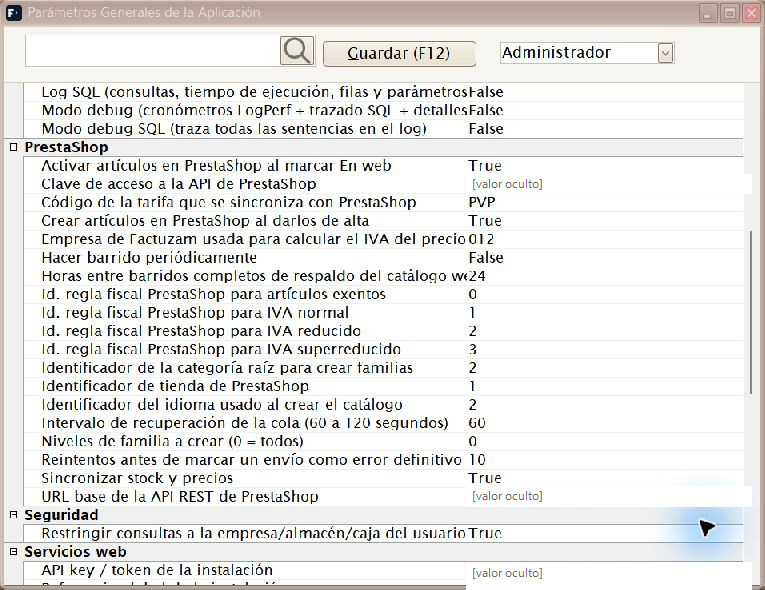
Effective PrestaShop configuration by scope; the API key and URL remain hidden.
- The user's specific value.
- Their group's value, if the user has not defined one.
- The value for
Todos, if there is no group value either.
A more specific profile replaces the general profile. This allows two companies to use users or groups with different companies, price lists, warehouses and PrestaShop shops. Each session processes only its effective configuration; it does not traverse the configurations for other profiles.
| Parameter | Use |
|---|---|
| Sincronizar stock y precios | Authorises the worker to update existing products located by a unique reference. It also authorises absolute quantity writes. Initial value: cleared. |
| Crear artículos en PrestaShop al darlos de alta | Requests a complete inactive creation when there is no match. It is independent of the synchronisation checkbox and starts cleared. |
| Activar artículos en PrestaShop al marcar En web | Its technical key is appPrestaShopActivarArticulosAlMarcarWeb. It is inherited by user, group or Todos and its initial value is False (cleared). When En web changes from No to Sí, it authorises active=1 only as the final step of a successful creation or synchronisation. It does not alter the rule that the product is first created with active=0. |
| Hacer barrido periódicamente | Enables complete catalogue reconciliation every few hours. Its technical key is appPrestaShopHacerBarridoPeriodico; it is inherited by user, group or Todos, and its initial value is False (cleared). It does not disable recovery of pending work every 60–120 seconds. |
| URL | API base URL, normally ending in /api. It starts empty and must be expressly configured in the correct scope. |
| Clave API | Webservice credential. Only the root administrator should see it, and it must not be copied into messages or logs. |
| Tarifa | Located under Otros ▸ Parámetros del entorno ▸ PrestaShop, it corresponds to the appPrestaShopTarifa key and its initial value is PVP. It is inherited by user, group or Todos. The effective price list provides the price of the parent product and each SKU; combination impacts are calculated from these values. |
| Reglas fiscales PrestaShop | Remote identifiers for standard, reduced, super-reduced and exempt VAT. The initial values 1, 2, 3 and 0 correspond to the local laboratory and must be checked in every shop before allowing creations. The product is not created without a valid match. |
| Empresa | Company used to resolve VAT, obtain the tax-exclusive price and select its web warehouses. |
| Id. tienda | Shop identifier within PrestaShop. |
| Id. idioma | Language used to create names, descriptions, categories and attributes. The initial laboratory value is 1. |
| Id. categoría raíz | Remote category beneath which the first local family is created. It must be greater than zero; the laboratory uses 2 (Home). |
| Niveles de familia a crear (0 = todos) | Its technical key is appPrestaShopNivelesFamiliaAlta. It is an integer inherited by user, group or Todos; initial value: 0. 0 retains the whole local hierarchy; a value greater than zero retains that number of levels counted from the leaf family. The subset is always created in root → leaf order. The configured PrestaShop root category does not count as a local level. |
| Intervalo de recuperación | Safety delay between checks for potential hangs or closures. It accepts 60 to 120 seconds; initial value: 60. Normal changes wake the worker immediately. |
| Horas entre barridos | Interval between full reconciliations when Hacer barrido periódicamente is selected. Initial value: 24 hours. |
| Máximo de intentos | Retries before leaving a job in ERROR. Initial value: 10. |
The two checkboxes that authorise catalogue maintenance start cleared and can be combined as follows. Activar artículos en PrestaShop al marcar En web and Hacer barrido periódicamente also start cleared, but do not change this matrix: the first determines visibility at the end of a process, and the second determines when to look for complete divergences.
| Sincronizar | Crear | Existing product | Missing reference |
|---|---|---|---|
| No | No | No changes are sent. | No creation is attempted. |
| Sí | No | Price and stock are updated. | Incident: creation not authorised. |
| No | Sí | It is located, but not modified. | It is created complete with active=0, without synchronising stock. |
| Sí | Sí | Price and stock are updated. | It is created with active=0, then the authorised values are synchronised. |
If En web changed from No to Sí and the activation checkbox is selected,
the active=1 request is added after the action shown in the matrix completes
successfully. If an earlier error occurs, the product is not activated. With
the checkbox cleared, a new product remains inactive and an existing product
retains its visibility.
Before selecting Sincronizar stock y precios, you must expressly configure and check the URL. A new installation does not assume any destination.
The former appPrestaShopActivo and appPrestaShopStockActivo keys, if they
remain saved after an installation is updated, no longer control the worker or
implicitly activate anything. Use the explicit controls described in the
table above.
If several compatible profiles share the same installation and shop but request different full-scan intervals, the most frequent interval is applied in practice. They all share the same remote marker to avoid duplicate catalogue scans.
The queue separates each destination by normalised URL and shop identifier. If you switch from a test shop to production, the remote identifiers from the previous installation are not reused. Configure different destinations for two companies with separate shops.
Several active profiles can share the same normalised URL and Id. tienda when their company, price list and synchronisation options are identical. Each profile can decide whether it participates in the periodic full scan. If the worker detects that any functional data differs, it treats the destination as contradictory, stops processing it and records a warning. Processing does not resume until the profiles are corrected to be compatible or assigned different destinations.
API key permissions
The key should have only the necessary permissions:
| Resource | Read | Create | Modify |
|---|---|---|---|
products | Sí | Sí, if creation is authorised | Sí |
combinations | Sí | Sí, if creation is authorised | Sí |
categories | Sí | Sí, if creation is authorised | No |
product_options | Sí | Sí, if creation is authorised | No |
product_option_values | Sí | Sí, if creation is authorised | No |
images | Sí | Sí, if creation is authorised | No |
stock_availables | Sí | No | Sí, with Sincronizar stock y precios |
languages, shops, shop_groups and VAT rules | Sí | No | No |
orders, customers, addresses and states | Sí, if orders are imported | No | No |
carriers and order_states | Sí, if orders are imported | No | No |
customer_threads and customer_messages | Sí, if orders and messages are imported | No | No |
Order permissions are read-only. Do not grant them if the function is not
used. The importer key must remain restricted to a single shop while the
orders query does not apply id_shop.
Do not grant delete permission unless a specific administrative operation has been designed and authorised. Automatic recovery must never delete a category, size or colour shared with other products.
4. Selecting items and warehouses
Artículos
Under Archivo ▸ Artículos, the En web checkbox determines whether the item participates in the integration.
- Selecting it queues a complete check of the item.
- Factuzam looks up the master product using an exact match on its
reference. - If there is exactly one match, Factuzam verifies it and updates the product and its SKUs only when Sincronizar stock y precios is selected.
- If there is no match and Crear artículos is authorised, it validates and performs the complete inactive creation.
- If creation is not authorised, the missing product ends in an incident.
- If there are several matches, it records an
ERRORincident without selecting any of them or creating a third. - If the flag changes from No to Sí and Activar artículos en PrestaShop al marcar En web is authorised, activation is requested only after the applicable creation or synchronisation finishes successfully.
- When it is cleared, Factuzam displays a dialog before saving.
Changing En web requires the Permisos ▸ Artículos ▸ Activar/desactivar web permission. Without it, the checkbox is read-only and saving cannot alter the flag either.
When En web is cleared, the dialog offers three choices:
- Sí: saves En web = No, stops synchronisation and requests remote deactivation (
active=0). - No: saves En web = No and only stops synchronisation. The product retains its existing visibility status in PrestaShop.
- Cancelar: does not save the change; the item remains En web.
In the first two cases, pending price and stock changes are cancelled. Removal does not make any other changes:
- it does not send zero stock;
- it does not change the last price sent;
- it does not delete the product;
- it does not delete combinations, categories or images.
If En web is selected again, Factuzam queues a complete check. Current price and stock are sent only when the effective profile has Sincronizar stock y precios selected. Final activation is requested only when Activar artículos en PrestaShop al marcar En web is also selected.
An SKU belonging to a web item is not physically deleted: it is marked
inactive in Factuzam to retain its reference. The integration stops sending
its price and, with synchronisation enabled, sends zero quantity. PrestaShop
does not offer an active field on the combination itself, so this operation
neither remotely “deactivates” nor deletes the SKU.
Almacenes
Under Archivo ▸ Almacenes, the En web checkbox selects the warehouses whose stock is added together for the online shop. You can select one or several, but each profile only uses warehouses belonging to its configured company. A selected warehouse from another company does not participate in that destination.
In addition to the flag, the warehouse must be:
- active;
- physical;
- of use type ESTANDAR.
Warehouses for taras, deposits and other non-standard uses are excluded even if someone tries to select them. New warehouses start with the checkbox cleared.
Selecting or clearing a warehouse queues the affected items so the total web stock can be recalculated. There is no need to visit them manually from the screen.
5. Queue, events, recovery and optional full scan
Price and stock changes in Factuzam's main processes call the queueing service within the same unit of work whenever possible. Several calls for the same item are grouped into one row. Once the operation has been committed, the process that generated the pending work wakes the consumer. The signal is cumulative: one hundred changes in a batch trigger one queue drain, rather than one hundred independent cycles. These signals do not reset or postpone the monotonic recovery deadline. Even when changes arrive continuously, the safety pass is still due every 60–120 seconds and cannot be blocked by normal queue activity.
| Status | Meaning |
|---|---|
PENDIENTE | There is a version to send or verify. |
PROCESANDO | A worker has temporarily claimed the item. |
PENDIENTE_VISIBILIDAD | An explicit activation or deactivation is pending. This can coexist with price or stock changes. |
PROCESANDO_VISIBILIDAD | A worker has temporarily claimed an activation or deactivation. |
ENVIADA | The claimed version was verified in PrestaShop. |
ERROR | Attempts have been exhausted or a terminal incident requires review. An ambiguous reference reaches this status immediately; a missing reference also does so when automatic creation is disabled or its requirements are not met. |
If the item changes while it is being sent, the new change increments its
version but does not release the current claim. When the previous send
finishes, the row returns to PENDIENTE. This prevents two workers from
writing old and new versions in reverse order.
When En web is cleared and No is selected, the same version control clears both change indicators. If Sí is selected, remote deactivation is also requested. A request already in progress may finish; the visibility decision is then applied where appropriate and no new price or stock versions are claimed. Cancelar neither saves the change nor alters the queue.
A recovery check is always performed every 60 to 120 seconds in case a process closed after queueing work or left an interrupted claim. The database grants this check to one Factuzam instance per destination. The winning process recovers expired claims and drains the pending work; the others do not repeat it. Clearing Hacer barrido periódicamente does not disable this mechanism. Signals received between two passes do not postpone its next due time either.
When Hacer barrido periódicamente is selected and the configured number of hours has elapsed, one enabled session runs the full reconciliation and requeues En web items that need it. This arbitration is separate from the recovery winner, so a profile with the checkbox cleared cannot prevent the full scan requested by another compatible profile. With the checkbox cleared, the whole catalogue is not traversed, but the queue continues to be recovered and processed every 60–120 seconds. A failure in full reconciliation does not prevent events from continuing to be processed.
Each session claims only the queue for the destination resolved by its effective profile. Destinations are isolated by normalised URL and shop identifier.
Before draining the queue, the worker rereads the effective profile from the
database using user → group → Todos inheritance. A change or deactivation
saved for the user, their group or Todos therefore reaches terminals that
are already open without restarting the application.
Monitoring window
You can review the queue under Otros ▸ Colas de envíos ▸ PrestaShop. The list displays the shop, item code and name, pending or claimed price and stock indicators, status, attempts, next-attempt, last-change and last-send dates, and the row's general error.
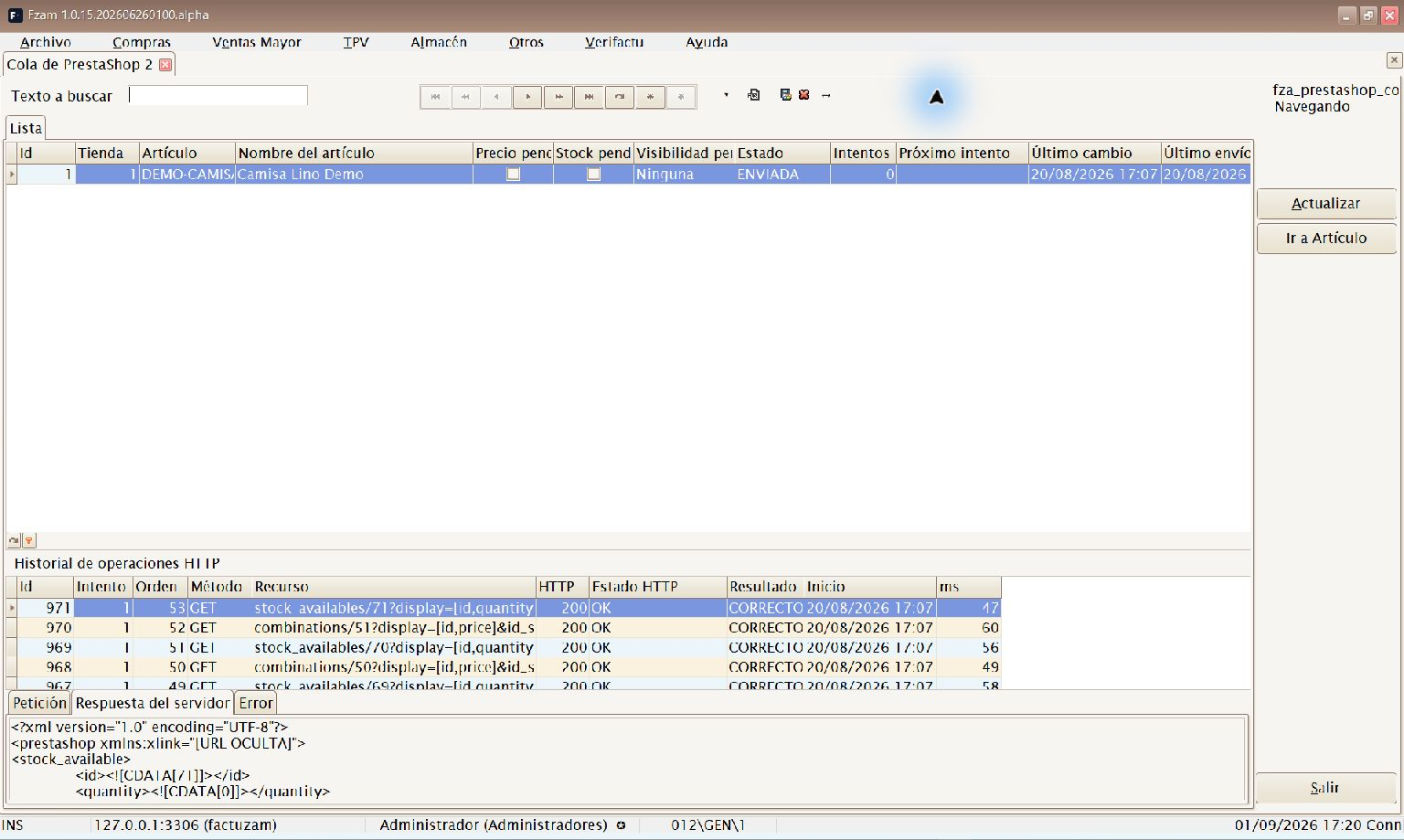
Catalogue jobs with their status and the selected item's HTTP operation history.
Selecting a row displays its history of HTTP operations, including attempt, sequence, method, relative resource, HTTP status code and text, result, start time and duration. Selecting an operation loads its Petición, Respuesta del servidor and Error tabs on demand. This prevents large bodies from being read when the main list is opened or traversed.
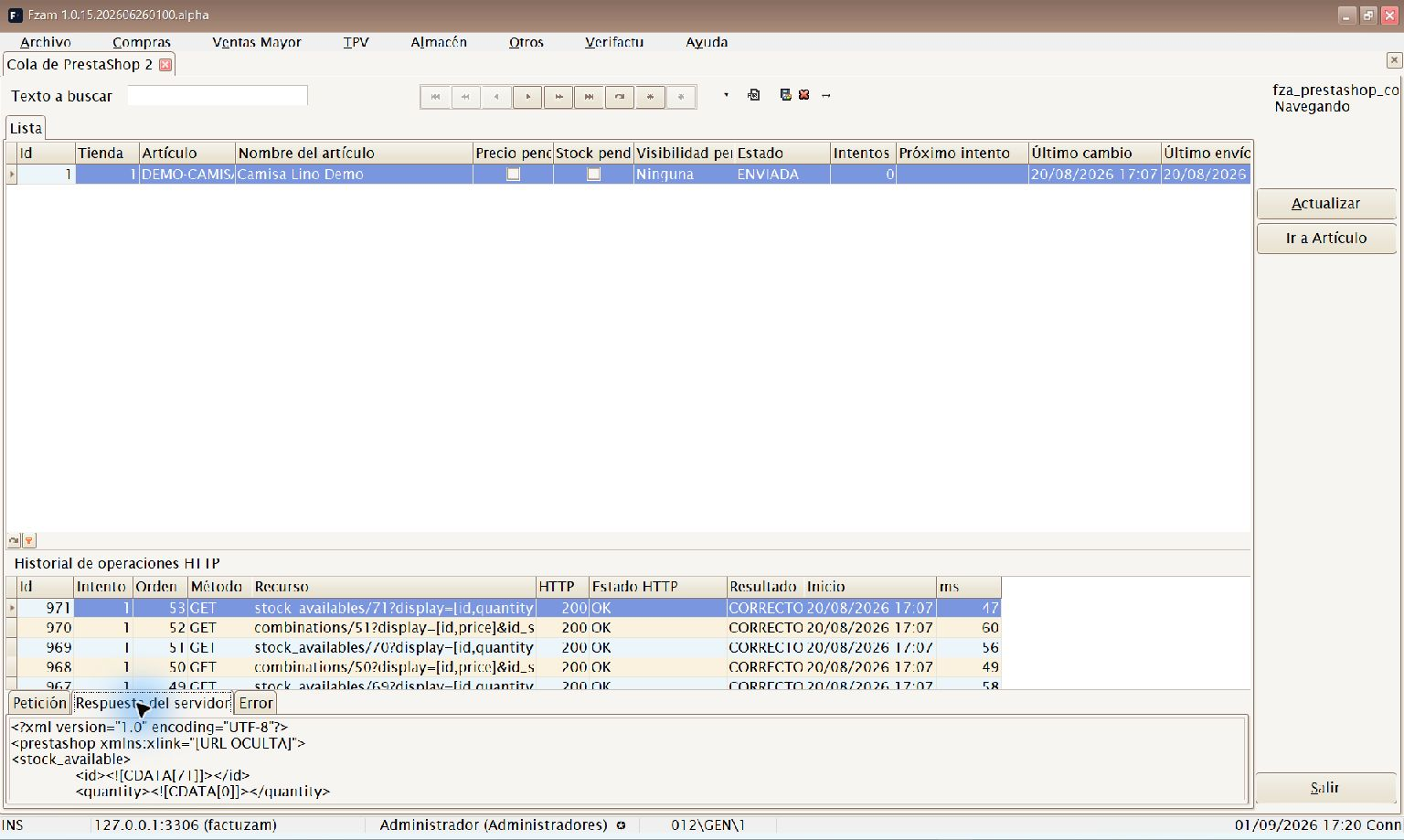
The Respuesta del servidor tab displays the safe response body recorded for the selected HTTP operation.
History begins to be retained when this version is installed. Operations performed previously are not reconstructed retrospectively.
The history is diagnostic. It does not store the API key, authorisation headers, binary content, base64 data or complete local paths. For an image upload, it retains only a safe description such as the name, size and hash. Text exceeding the storage limit is cut with a visible truncation marker.
The window is read-only and does not allow a row to be edited, deleted or retried. It only provides options to refresh the enquiry, export it when permission exists, and open the related item. Separate Consultar, Excel and Ver petición/respuesta permissions control access to the list, export and detail respectively. An administrator can view every destination; other users see only the shop resolved by their effective configuration.
The grid displays the Id. tienda, but not an installation label. If you monitor several installations that reuse the same shop identifier, this value alone cannot distinguish them; check the effective destination before interpreting or exporting the row.
Closing Factuzam during a send
If you try to close Factuzam while this instance is processing an item, new claims are first blocked and three options are offered:
- Esperar: finishes only the current item and then closes.
- Cerrar de todos modos: does not interrupt the HTTP request already in progress. It waits for its return, puts the item back into pending without consuming an attempt, and then closes.
- Cancelar cierre: keeps Factuzam open, unblocks claims and resumes queue consumption.
Forced closure may take until the current network operation has finished. The released row retains its price, stock or visibility changes and can be claimed by this or another instance during the next cycle.
6. Product and SKU prices
PrestaShop stores tax-exclusive prices:
products.priceis the product's base price;combinations.priceis the combination impact on the base;- the effective price of an SKU is the sum of both.
Factuzam obtains the current final price from the effective profile's price
list and company. If the price list includes VAT, it divides it by
1 + tipo de IVA / 100 before sending it.
For existing products, the current integration neither changes nor validates
id_tax_rules_group: the administrator must check that the remote tax rule is
correct. During creation, it uses the identifier configured for the local VAT
type; it is not enough for both systems to display the same percentage.
Example with VAT at 21%:
| Concept | Price including VAT | Tax-exclusive price sent |
|---|---|---|
| Base product | 31,95 | 26,404959 |
| SKU with its own price | 29,95 | 24,752066 |
| Combination impact | — | -1,652893 |
Do not send 29,95 directly as combinations.price, because PrestaShop would
add it to the base price again.
When only one SKU changes, PrestaShop 9 allows just that combination to be modified. Factuzam nevertheless recalculates and verifies every combination for the item. If the base price changes, it recalculates all impacts so the effective prices of the other SKUs remain correct.
This behaviour was verified on the local PrestaShop 9.1.4 shop using a product
with three combinations. When only one impact was changed, the base price and
the other two combinations retained their values. The test also confirmed
that combinations.price is an impact rather than the final SKU price.
7. Creating a missing item
The Crear artículos en PrestaShop al darlos de alta checkbox is available,
starts cleared and is independent of Sincronizar stock y precios. A
missing reference starts creation only when this checkbox is selected. An
ambiguous reference ends in ERROR and never triggers creation.
Creation is not a single request. The worker runs this sequence against several PrestaShop resources:
- Validate all local data without creating anything yet.
- Resolve or create the family category path beneath the configured root.
- Resolve or create attribute groups such as Color and Talla.
- Resolve or create the values used by the SKUs.
- Create the master product with
active=0. - Create one combination for every active SKU and deterministically select a single default combination.
- Upload a genuine general photograph if the product does not yet have one.
- Continue with price and stock synchronisation only if authorised.
- If the process resulted from selecting En web and the profile authorises it, activate the product only after all the previous steps have completed successfully.
The product is always created complete and initially inactive. With
appPrestaShopActivarArticulosAlMarcarWeb=False, it remains so until manual
review. With the parameter set to True, the same job can activate it as its
last step. A partial creation or a synchronisation with an error must never
leave the product visible.
Preliminary validation
Before the first POST, at least the following must be checked:
- non-empty, non-duplicate item code and SKU references;
- active item, family, price list and attributes;
- complete, cycle-free family hierarchy;
- name and description valid for the PrestaShop limits;
- current base price and effective price for each SKU;
- VAT match with a remote tax group;
- a valid value for every required variation axis;
- registered, existing and readable genuine photograph;
- unambiguous absence of the product and its references in PrestaShop.
If a requirement is missing, the item remains in ERROR with a specific
cause, and local validation prevents creation from starting.
Administrator review
The administrator signs in to the PrestaShop back office and checks:
- Name, description and category.
- VAT type and rule.
- Sizes, colours and default combination.
- Final price for several combinations, including those with a negative impact.
- Cover photograph and images by colour.
- Stock policy and availability for orders.
Only then should they activate the necessary new categories. If automatic activation is cleared, they should also activate the product manually. If it is selected, check that the job finished without error and that the product only became visible at the end.
8. Families and categories
During creation, the Factuzam family becomes a PrestaShop category. The
inheritable Niveles de familia a crear (0 = todos) parameter
(appPrestaShopNivelesFamiliaAlta) determines which part of the local
hierarchy is exported:
0: the whole local hierarchy, from its root to the leaf family;N > 0: the lastNlevels, counted upwards from the leaf family.
The selected subset is retained and created in root → leaf order: parents
come before their children. The configured PrestaShop root category is only
the remote point beneath which the subset is attached and does not count
as one of those levels. For example, DEMO-CAMISA belongs only to the local
ROPA family; therefore 0, 1 or any higher value exports only that local
level.
An existing category retains its status. In the current implementation, new
categories are created active. The product is created with active=0 and can
only be activated afterwards, as the final step, according to the activation
parameter.
Identity cannot be based on name alone. Two branches can contain a category with the same name. Before creating one, the implementation looks for the combination of parent and normalised link:
tienda + categoría padre + enlace normalizado -> id_category remotoThe product uses the leaf family as id_category_default and also includes it
in its category associations. The root category beneath which families are
exported must be configurable for each shop.
9. Sizes, colours and combinations
Local attributes from a variation are converted as follows:
| Factuzam | PrestaShop |
|---|---|
| Talla type or axis | product_option, type select |
| M, L, 44… value | product_option_value |
| Color type or axis | product_option, type color |
| Negro, Azul… value | product_option_value, with a hexadecimal colour where available |
| SKU | combination |
Every combination retains the exact local SKU code as its reference and
associates all its values, for example Color: Azul and Talla: L. Only
active SKUs are created. One combination is then set as the default: the first
according to the stable attribute and reference order.
Sizes and colours are shared resources. Before creation, Factuzam looks for the corresponding remote group or value. If several matches exist and it cannot determine the correct one, creation stops for review instead of making an arbitrary selection.
10. Genuine photographs
Factuzam records photographs by item, by SKU prefix—normally the colour—or by complete SKU. The integration uses the real resolution:
<appDirFotos>\real\<nombre registrado>.pngThe source extension saved in the database is informational. The operational file generated by Factuzam is PNG.
In the current implementation, the general main photograph is selected and uploaded only when the remote product has no images. PrestaShop automatically generates the derived sizes. Galleries, replacement of a photograph already uploaded and association of photographs by colour are outside the current workflow and must be handled manually.
In an installation where
fza_articulos_fotosis empty, the existence of loose files in the folder is not sufficient. First associate the photographs with their items or SKUs. This relationship is not guessed from the file name.
11. Stock safety
Web stock is calculated by adding only eligible warehouses and limiting the minimum result to zero. The seconds warehouse is never included.
However, the standard PrestaShop Webservice receives an absolute quantity. If a web sale has not yet been reserved automatically in Factuzam, a later local movement could write a quantity that restores units already sold.
For this reason:
- Sincronizar stock y precios remains cleared by default;
- the current checkbox jointly authorises price and stock: there is no separate stock authorisation in the current worker;
- it must not be selected in production until automatic web-order ingestion or reservation and complete concurrency testing are available;
- services, seconds, deposits and non-standard warehouses are excluded.
Shared stock between shops is not currently supported either. The client
requires a stock_available row belonging exactly to the configured shop and
fails safely if PrestaShop uses id_shop=0 with a shop group. That mode will
first require validation of share_stock and the effective group.
This caution does not prevent the creation of families, product, combinations, prices or the main image. With synchronisation cleared, the new product is prepared and remains inactive without publishing local stock.
12. Retries and duplicate prevention
The API does not provide a single transaction for creating the complete catalogue. Creation is treated as a resumable sequence:
VALIDAR -> CATEGORIAS -> ATRIBUTOS -> PRODUCTO_INACTIVO
        -> SKU -> IMAGEN_PRINCIPAL -> SINCRONIZACION_AUTORIZADA
        -> ACTIVACION_FINAL_OPCIONAL
Before each creation, Factuzam looks up the remote resource by its identity. If
the network is interrupted, the next attempt searches again and reuses what
already exists. The functional test suite must verify this idempotency,
especially with two concurrent workers, because the lookup and POST do not
form a single transaction.
Safety rules:
- an ambiguous reference never triggers a new creation;
- product and SKU are resolved by exact reference and parent relationship;
- categories and attributes are searched within their parent or group;
- an image is not uploaded again if the product already has one;
- a failure never activates the product;
- shared resources are not deleted as automatic compensation.
13. Troubleshooting
| Incident | Check |
|---|---|
| 401 / 403 | Check the API key and permissions; do not copy the key into the support report. |
| Producto no encontrado | If creation is cleared, an immediate ERROR is recorded. If selected, check the local requirements and the Webservice POST permissions. |
| Referencia ambigua | An immediate ERROR is recorded. Correct duplicates in PrestaShop; Factuzam neither selects one nor creates another automatically. |
| Categoría o talla duplicada | Check the installation and shop mapping, not only the visible name. |
| Precio de SKU demasiado alto | Check that an impact, rather than the final price, is sent as combinations.price. |
| Foto no encontrada | Check appDirFotos, the fza_articulos_fotos row and the PNG under real. |
| Almacén no incluido | It must be En web, active, physical and of use type ESTANDAR. |
| Artículo nuevo no aparece en la página | Creation always starts with active=0. Check whether Activar artículos en PrestaShop al marcar En web is cleared, whether the job finished without error, or whether final activation remains pending. With the checkbox cleared, activate it manually after review. |
| Artículo desmarcado sigue visible | If No was selected, this is the requested behaviour: only synchronisation stops. To remove it, select and clear it again and choose Sí, or deactivate it manually in PrestaShop. |
| Cancelé al quitar En web | The change is not saved, the product is not deactivated and the queue is not modified. |
| Se crean demasiados niveles de categoría | Check Niveles de familia a crear (0 = todos). Positive values are counted from the leaf; the configured PrestaShop root does not count. |
| Fila en ERROR | Correct the cause and requeue. The retry looks for and reuses resources already created; check that there are no duplicates. |
| Desmarqué el barrido y se procesó un pendiente | This is correct: the checkbox only disables the hourly full reconciliation. Recovery of pending rows and interrupted claims continues every 60–120 seconds. |
Error messages and logs must never include the API key.
14. Implementation checklist
- Apply the database migration and check the En web flags.
- First configure a test shop running the same version as the live shop; do not use production for initial validation.
- Create a least-privilege API key. If orders are imported, add read-only access to
orders,customers,addresses,states,carriers,order_states,customer_threadsandcustomer_messages. - Configure the correct scope—user, group or
Todos—URL, shop, company and price list with all four checkboxes cleared. - While the import does not filter by
id_shop, use a key dedicated to one shop and do not enable the workflow in a multistore installation. - Check Niveles de familia a crear (0 = todos): use
0for the whole local hierarchy or a positive number counted from the leaf family. - Select only the standard warehouses that will contribute web stock.
- Review families, VAT, SKUs, attributes, prices and genuine photographs.
- Test an item with several colours, sizes and prices by SKU.
- Confirm that an ambiguous
referenceproduces an immediateERRORwithout creating resources. - Keep Crear artículos en PrestaShop al darlos de alta cleared until the laboratory functional test suite passes.
- Sign in with the correct company and warehouse; in the laboratory, import one order with carriage and one without. Review the customer, products, SKUs, VAT, totals and the
GASTOS_Tservice line. - Repeat the same
ID PS, trigger an intermediate error and confirm that the order is not duplicated and that subsequent selected orders continue. Do not run two concurrent imports of the same order. - Fulfil the test order through to delivery note and invoice:
GASTOS_Tmust retain the SERVICIO type, net amount and VAT without moving stock; the physical lines must move it. - Test the Esperar, Cerrar de todos modos and Cancelar cierre closing options during a controlled real send.
- Verify automatic web-order ingestion or reservation, separate from manual import, before authorising absolute quantities.
- Keep Sincronizar stock y precios cleared until there is a documented GO decision for the complete test suite.
- With automatic activation cleared, repeat creation to confirm that it retains IDs, does not duplicate resources, and leaves the product complete but inactive.
- In the laboratory, select Activar artículos en PrestaShop al marcar En web and check that
active=1is requested only at the end of a successful process; trigger an earlier error and confirm that it is not activated. - Test all three responses when clearing En web: Sí deactivates, No only stops synchronisation, and Cancelar does not save.
Development tests are performed only against the current local PrestaShop installation. Test creations or changes are not made in the production shop.
15. Official technical references
- Creating a complete product with Webservice
productsresourcecombinationsresource- Attribute groups
- Attribute values
- Image management