12 · Changes and new features
This chapter brings together Factuzam's recent new features and separates them from functions that have now been incorporated into the main manual. The new capabilities are described here; for day-to-day use, go to the relevant menu chapter.
Documentation review: 1 September 2026. A function's inclusion in this chapter does not replace checking the installed version or its production validation status.
Recent new features
| New feature | Where to find it |
|---|---|
| Factuzam Control U on Android and the web: stock, inbound quantities, sales and pending receipts by colour, size and warehouse, with filters, history and photographs, always read-only. | Mobile applications ▸ Control U |
| New read-only sales web with totals, filters, till closures, receipt PDF, up to three grouping levels and fictitious demo data. | Mobile applications ▸ VentasFzam and web |
| Gallery with several photographs per item or SKU, navigation, a default image, rotation and 300/600/Real resolutions. | Common concepts ▸ Floating photograph |
| Documentos de Trabajo ▸ Cargar ▸ Desde documento: company fixed by the header, filters by type/series/number and a preview before copying lines. | Almacén ▸ Loading from a document |
| Tokenised series by calendar period: templates with a year, quarter, month or day and bulk creation for every document type at a location. | Archivo ▸ Empresas ▸ Numbering series with tokens |
| Price-list Aplicación del descuento, with Solo si or Todos excepto lists, SKU/colour/item priority and a conservative rule when no value exists. | Archivo ▸ Tarifas |
| Integrated Contazam workflow: reviewable imports, banks, reconciliation, debt, taxation, analytics, audit and closing. | Factuzam and Contazam |
Manual import of PrestaShop orders, with controlled creation of customers and items, and carriage recorded as the GASTOS_T service with standard VAT and no stock movement. Use remains restricted to a laboratory environment and a single controlled destination. | Ventas Mayor ▸ Pedidos · PrestaShop integration |
| Central Otros ▸ Colas de envíos menu for monitoring Verifactu, PrestaShop and Web Service Fzam from their actual location. | Otros ▸ Colas de envíos |
| Web Service Fzam queue with sales and PDF events, statuses, HTTP history, exponential retries and access to the associated document. | Otros ▸ Colas de envíos ▸ Web Service Fzam |
| Histórico de Solicitudes de Traspaso with quantities fulfilled/not fulfilled, reasons, transfers and related stock movements. | TPV ▸ Histórico de Solicitudes de Traspaso |
| Facturas proforma by period: an internal, non-tax pro forma document for VE sales or Ventas Mayor drafts for TA transfers. | TPV ▸ Facturas proforma |
| Procesos auxiliares BBDD for inspecting the SQL structure and contents of tables. | Otros ▸ Procesos auxiliares BBDD |
[F1] changes the line presentation between Auto/breakdown, SKU and the size modes; the cycle adapts to each document type. | Common concepts ▸ Line modes with F1 |
| Purchase orders with partial receipt by line or size, Recibir Todo, Pedido/A recibir/Pendiente bands and the option to add them to an existing delivery note. | Compras ▸ Pedidos |
Consulta de stocks de Factuzam with [Ctrl]+[U]: stock on hand and pending quantities by colour, size and warehouse, broken-down statuses, related photographs and sending to Documentos de Trabajo. | Ayuda ▸ Consulta de stocks |
| Factuzam Fotos Nube Android application for taking photographs by item/colour, queuing them and uploading them to the server in batches. | Mobile applications ▸ Fotos Nube |
| Administration of errors sent to support: protected evidence, conversation, tracking by user and verified script or update proposals. | Ayuda ▸ Envío de errores |
Translatable interface backed by a central catalogue, downloadable en-GB, ca-ES and zh-CN packages, Spanish fallback and a standalone translation editor. | Otros ▸ Parámetros del entorno ▸ Apariencia ▸ Idioma |
| Ticket correction by differences or by means of a replacement document, with tax traceability and consistent treatment of sales and stock. | TPV ▸ Rectificar un ticket |
| Purchase sessions with a provisional photograph, preview and automatic migration of the image to the materialised item or SKU. | Compras ▸ Fotos de la sesión |
| VentasFzam mobile application for viewing the day's sales, photographs, cost, margin and discounts without modifying data. | Mobile applications ▸ VentasFzam |
| Layered architecture, progressive application of SOLID, and a catalogue of reviewable, configurable SQL queries with validation and fallback. | Architecture and development |
| Listado de operaciones de venta del TPV by date, with the base colour shown visually and cumulative selection of companies/warehouses/tills when the user is not restricted. | TPV ▸ Listados |
| Documentos de Trabajo: item/SKU lists that can be shared, used to print labels and sent to a delivery note, POS, inventory or price-list change. | Almacén ▸ Documentos de Trabajo |
Búsqueda de datos de artículos with [Ctrl]+[E] from any window: by size, colour, palette proximity, stock and saved profiles. | Common concepts ▸ Data search |
| Customer account at the POS (F2): loading deposits and payments on account, cancellation by sign and allocation of a partial payment across deposits. | TPV ▸ Ventas |
| Payment-effects report with filters by due date, supplier, bank/remittance, type and status. | Compras ▸ Listados |
| Ayuda menu with direct access to the web manual and support forum. | Ayuda menu |
| Issuing a signed Facturae eDoc from consolidated wholesale sales drafts. | Ventas Mayor ▸ Borradores |
| Customer eDoc parameters: DIR3 and natural-person details. | Clientes |
| Facturae code in payment methods for reporting the official means of payment. | Formas de pago documentos |
| Customer collection effects and reconciliation of due amounts. | Efectos de cobro |
| Collection remittances, loading effects and SEPA generation. | Remesas de cobro |
| Purchase invoices/drafts created from delivery notes and available for addition to an existing document. | Compras ▸ Crear borradores de albaranes |
| Complete purchase migration: orders, delivery notes, returns, invoices, effects and remittances. | Migration from legacy software |
New Factuzam capabilities
Control U in a browser and on mobile devices
Factuzam Control U brings stock enquiries to a browser on the local network and to mobile devices. It uses Factuzam access and permissions, does not connect directly to MariaDB and operates in enquiry mode.
It can:
- search by item code, SKU or EAN; the Android app can use the camera and torch, while the website accepts manual input or a keyboard scanner and does not use the camera;
- enquire on Stock, Entradas, Ventas and Pendiente de recibir;
- display quantities by colour, size and warehouse, with totals and expandable rows;
- switch the pivot between colours and warehouses, filter values and hide zeroes;
- browse item history and display its photograph when available.
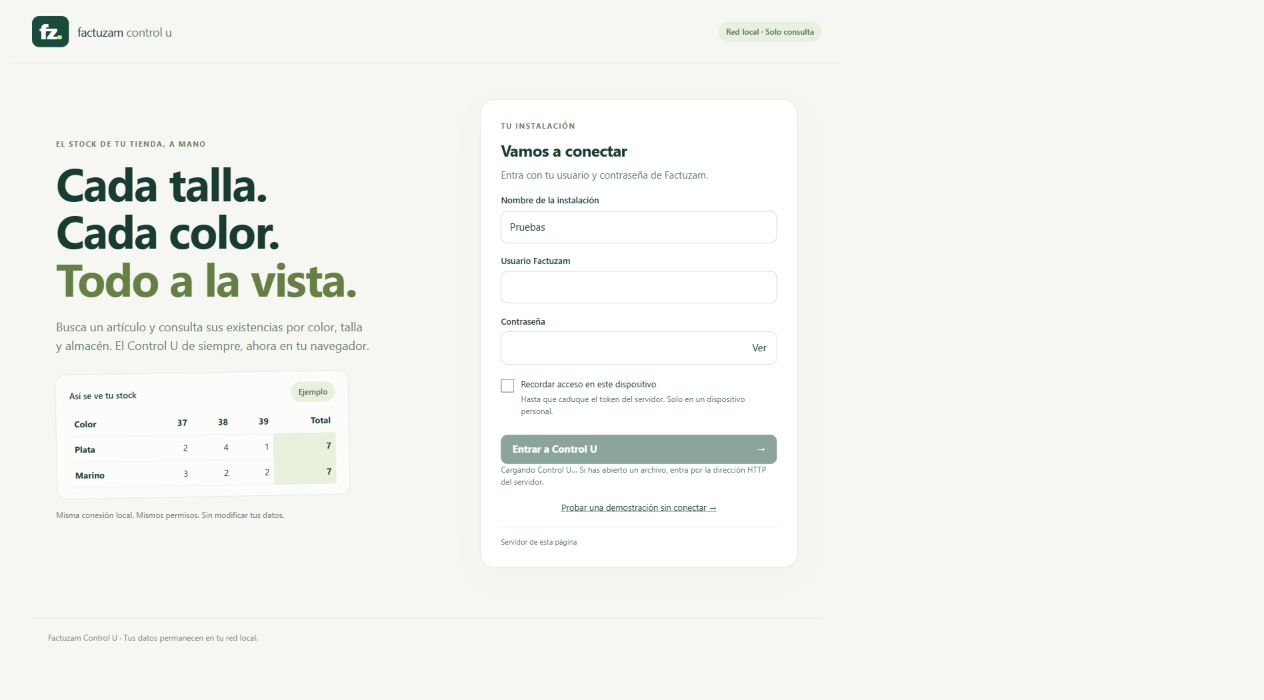 Control U retains the installation's permissions and displays a stock matrix
without changing the data.
Control U retains the installation's permissions and displays a stock matrix
without changing the data.
The address must be opened from the installation server. Reserve http:// for
a trusted local network and use https:// when access extends beyond that
network. If Recordar acceso is enabled, do so only on a personal,
controlled device, because the browser retains the token until it expires.
VentasFzam and the sales website
VentasFzam and its new web view are read-only enquiries. They display the day's sales, photographs, cost, margin and discounts, with filters for company, warehouse, season, family and supplier. They also show till closures and can organise the list using up to three grouping levels and their subtotals.
The website adds Ver ticket PDF, remembered access for 30 days on a personal device, Mi instalación, Olvidar and Reintentar. Events arrive through the Web Service Fzam queue, so the till can continue working while the network is temporarily unavailable.
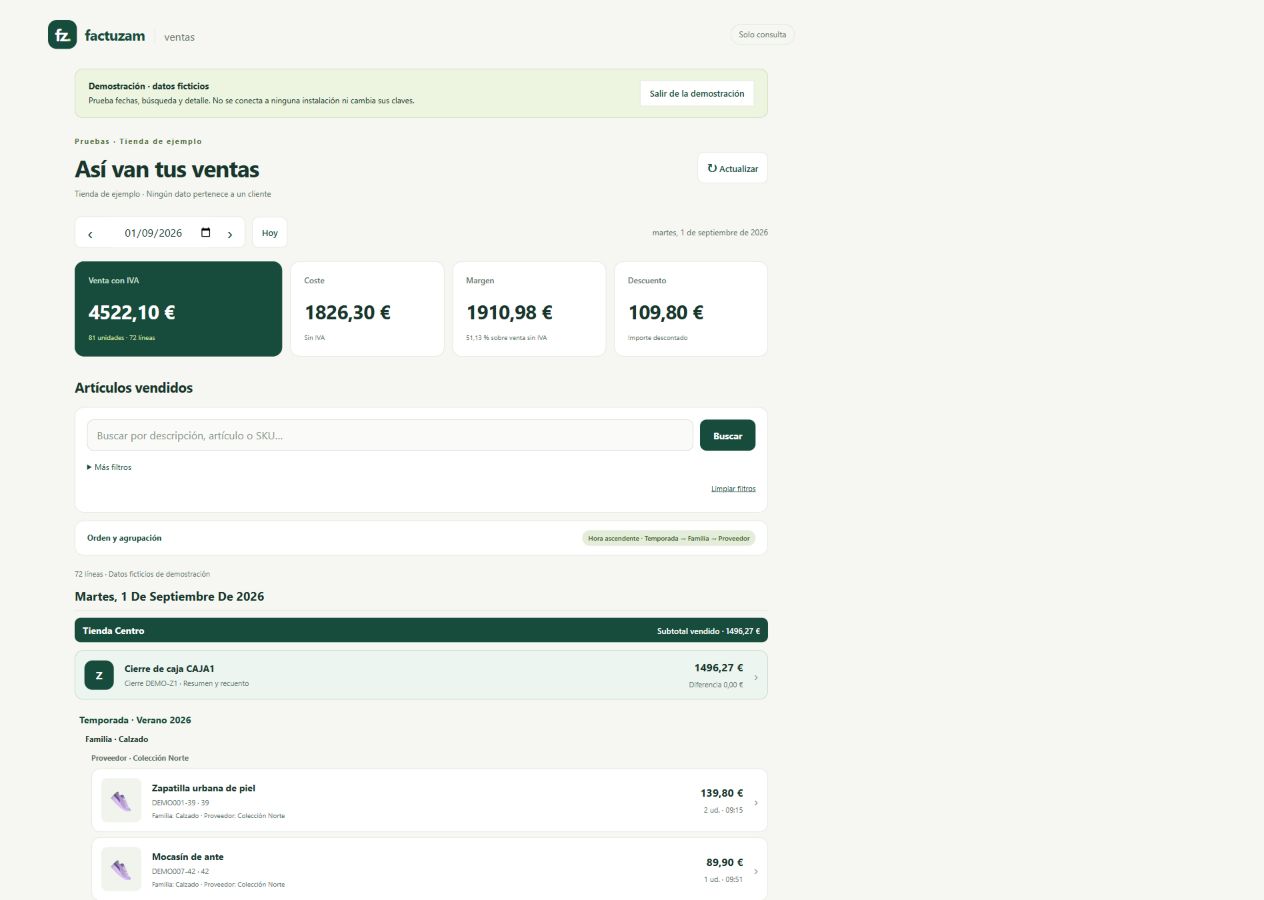 The demonstration uses invented data and lets users test dates, filters,
groupings, closures and details without connecting to an installation.
The demonstration uses invented data and lets users test dates, filters,
groupings, closures and details without connecting to an installation.
Multiple photographs per item or SKU
Factuzam Fotos Nube captures images by item and colour, queues them and
later incorporates them into the catalogue. In Factuzam, [Ctrl]+[F] now
opens a gallery containing multiple photographs for the selected item or
SKU/colour level.
The gallery lets users browse Anterior / Siguiente, view the counter, add, replace or delete an image, mark the default image, rotate it and choose between the 300, 600 and Real resolutions. When an SKU has no image of its own, it can continue to inherit the main image from the nearest level.
See the procedures under Floating item/SKU photograph and Factuzam Fotos Nube.
Loading from a document in Documentos de Trabajo
Under Almacén ▸ Documentos de Trabajo, open an editable document and choose Cargar ▸ Desde documento. The company is fixed by the header; the selector can filter recent documents by Tipo, Serie and Número, and provides a preview before adding the lines.
Thirteen sources are supported: purchase or sales orders, delivery notes and invoices, returns, POS, transfers and requests, purchase sessions, stocktakes and price lists. Check the item/SKU, description, warehouse and quantity in the preview; the lines are only added to the Documento de Trabajo after confirmation. The source document is not changed.
The selection can then be used for labels or sent to create sales, purchase,
POS, transfer, stocktake or price-list change documents. When a saved
destination is materialised, your own document changes to ENVIADO. See
Work Documents.
Stocktakes and controlled recoding
- The mobile stocktake returns quantities to an open stocktake; the mobile device does not adjust stock by itself.
- Excel stocktakes retain the actual date and time of the count. The Valorar action simulates an appreciation or depreciation against the weighted average cost and displays the previous and proposed values; stock changes only when Regularizar is run.
- Otros ▸ Cambio de artículo o color recodes or merges references while retaining their history. If the destination already exists, Factuzam relates movements and documents, deactivates the source and recalculates the weighted average cost, provided the tax rules permit the operation.
Enabling or excluding discounts in a price list
Open Archivo ▸ Tablas Auxiliares ▸ Tarifas, select the price list and enter Aplicación del descuento. The mode determines which items or SKUs receive the discount set on its lines:
| Mode | Result |
|---|---|
| Todos | Applies the discount to all items while the price list and its date window remain valid. |
| Solo si | Applies the discount only when the effective property has one of the selected values. |
| Todos excepto | Enables the exclusion: applies the discount to every item except those with the selected values. |
For Solo si or Todos excepto, choose an active list-type property, select its values and press Guardar aplicación. Factuzam resolves the value in the order SKU ▸ colour ▸ item. If there is no effective value, it follows the conservative rule and does not apply the discount.
Only one property can be configured per price list. To disable the exclusion and return to general behaviour, choose Todos and press Guardar aplicación.
This condition is combined with Dto. desde / Dto. hasta: both the rule and date must be satisfied. When they are not, the final price returns to the starting price without a discount. See Price lists.
Replacement corrective invoicing
A completed sale is not edited. Under TPV ▸ Buscar / Modificar (F10), locate the receipt, press Rectificar and choose Sustitutiva. Factuzam opens a new positive operation so that it contains the complete, correct version.
When it is completed with [F12], Factuzam uses a corrective series, links the
new document to the original and records or queues it according to the tax
mode. The original sale is replaced and no longer counts as active; the new
sale provides the corrected amounts and stock movements. Do not confuse this
option with Convertir en normal, which only creates an invoice bearing the
customer's details.
See how this workflow compares with correction by differences under Correcting a receipt.
Languages and asynchronous work
Factuzam distributes complete es-ES, en-GB, ca-ES and zh-CN packages
from a central catalogue. The language is selected within the application, and
the standalone editor can maintain translations without changing the
executable.
Operations that depend on external services—such as VeriFactu, PrestaShop or the Web Service Fzam—are recorded in queues with statuses, attempts and HTTP history. The commercial document is not blocked while waiting for the network. Users can monitor these queues under Otros ▸ Colas de envíos.
Backups can be generated in encrypted .crypt format; the available formats
and automations depend on the user's permissions. Before merging items,
performing a bulk stock adjustment or restoring data, create and verify a
backup appropriate for the installation.
Incorporated into the manual
The following functions are no longer treated as newly added. They are grouped by working area and documented in the regular chapters of the manual.
Archivo and catalogue
| Incorporated function | Where to find it |
|---|---|
| Bank accounts by company, with default collection and payment flags. | Empresas |
| Default collection bank for customers. | Clientes |
| Default payment method and payment bank for suppliers. | Proveedores |
| Quantity kits by size for purchase sessions. | Proveedores ▸ Compras |
| Photographs by item, colour or SKU, with a floating window and download from the server. | Common concepts ▸ Floating photograph |
| Units of measure with decimal quantities by unit. | Unidades de Medida |
| Basic attributes and standard colour/size equivalents. | Atributos básicos |
| Price-list change sessions and date windows for discounts. | Tarifas |
Compras
| Incorporated function | Where to find it |
|---|---|
| Purchase sessions with kit application and supplier tab. | Sesiones de compra |
| Informational Depósito flag on purchase delivery notes. | Albaranes de compra |
| Supplier returns as a separate document with stock issue. | Devoluciones a Proveedor |
| Purchase drafts with effect generation. | Borradores |
| Supplier payment effects and remittances. | Efectos de pago |
Sales and Caja
| Incorporated function | Where to find it |
|---|---|
| Borradores terminology before tax closure. | Ventas Mayor ▸ Borradores |
| Creating sales drafts from delivery notes within a date range. | Albaranes de venta |
| Simplified till drafts and conversion to a normal draft. | TPV ▸ Borradores Simplificados |
| POS with photograph, colour/size and SKU details on lines. | TPV ▸ Ventas |
| Complete extension of the till flow: working day, tickets, vouchers, loans, transfers, cash count and till roll. | TPV |
| Details of all Caja parameters and their current operational effect. | TPV ▸ Parámetros de Caja |
| Cash-count history from the POS, with duplicate ticket/closure. | TPV ▸ Arqueo |
| A4 cash-count history report. | TPV ▸ Histórico de Arqueos |
Almacén and reports
| Incorporated function | Where to find it |
|---|---|
| Mobile stocktaking with an Android app and bridge server. | Inventarios ▸ Recuento móvil |
| Horizontal warehouse balance by size, with photographs, filters, bands and groups. | Balance de Almacén Horizontal |
| Warehouse balance without sizes for the entire catalogue. | Balance de Almacén sin tallas |
| Sales movements by item and date, with margins. | Movimientos de ventas por artículos y fechas |
| Tree-based family filter in reports. | Informes de almacén |
Administration and taxation
| Incorporated function | Where to find it |
|---|---|
| Centralised Fotos, Recuentos and Verifactu parameters. | Parámetros del entorno |
| Tree-based permissions by menu and screen action. | Permisos |
| Employees kept separate from users for till operations, transfers and cash counts. | Empleados |
SIN, VERIFACTU and NO_VERIFACTU tax modes. | Verifactu ▸ Configuración |
| XML export of NO VERI*FACTU records. | Verifactu Log |
| Verifactu transaction type for intra-Community transactions, reverse charge and exports. | Verifactu en la ficha |